Face Swap - Photo Editor AI
- 3.7
- Rating
- 500.00K
- Installs
- Free
- Price
 Analysis by App-foxy
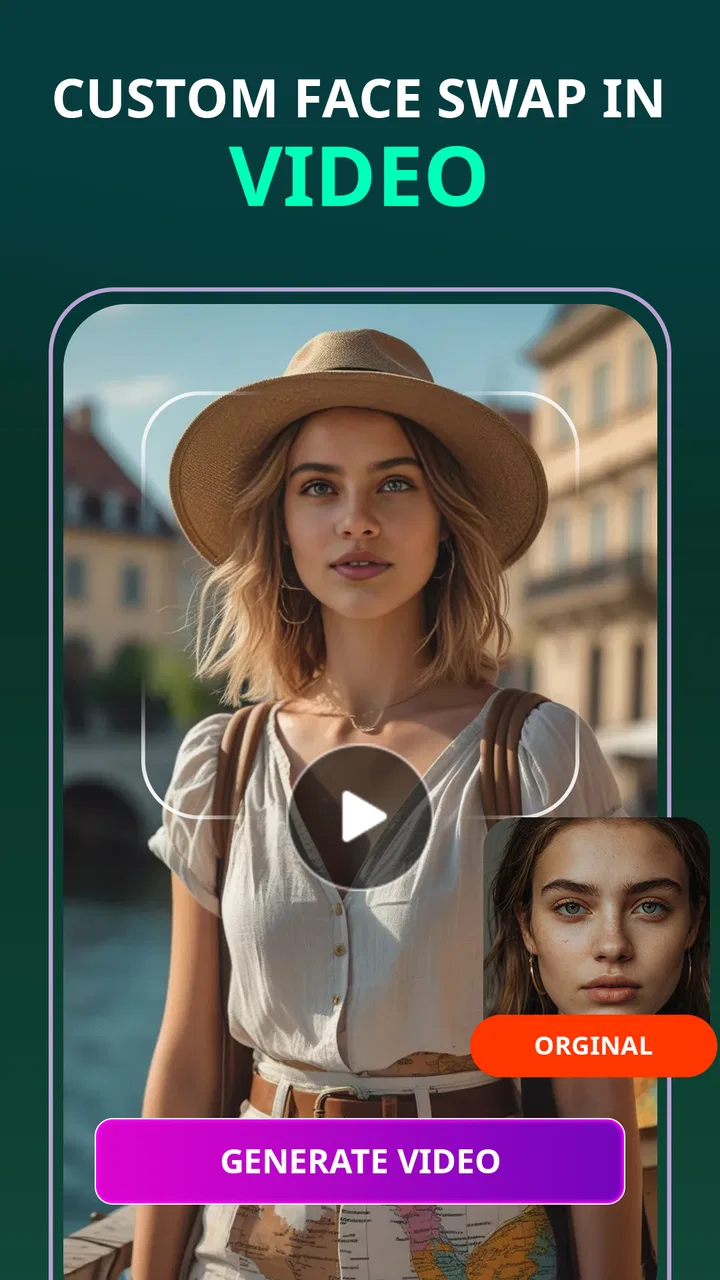
I tried Face Swap - Photo Editor AI as a quick beauty and avatar-making tool, and my first impression was that it aims for instant visual results rather than detailed editing. The app is built around changing a face inside video content, with a focus on professional-looking characters, superhero-style transformations, and current avatar trends. That makes it more playful than a traditional beauty editor, but also means the quality of the source material matters a lot.
What I like about this kind of app is the short path from an idea to something shareable. I do not need to spend a long time learning layers, masks, or manual retouching before seeing a result. At the same time, I would not treat it as a complete replacement for a full photo or video editor. Its appeal is the automated face-swap experience, not precise control over every pixel.
How the app feels in everyday use
The app belongs to the beauty category, although its strongest identity is really a mix of AI avatar creation, entertainment, and short-form video editing. I can imagine opening it when a friend sends a themed clip, when I want to test a superhero look, or when I need a quick visual for a social post without building the effect manually.
You May Also Like

 Blood Strike: 2.5 Anniversary
Blood Strike’s Loadouts Turn Every Drop Into a Tactical Gamble
A close look at Blood Strike’s custom loadouts: how fast access to signature weapons reshapes its battle royale rhythm, rewards preparation, and narrows the gap between fights.

 Pandora - Music & Podcasts
Pandora’s Music Is Easy to Start, but Harder to Recover
Pandora’s strength is its low-effort path from a seed to a station. Its weak spot is how much confidence it asks you to place in connection, setup, and quiet recovery.

 8 Ball Pool
 Is Built on Rivalries, Rematches, and Routine
A close look at the rivalries, rematches, shared routines, and unanswered safety questions that turn a quick pool match into a persistent mobile community.

 Samsung Music
’s Quiet Strength Is Playing What You Already Own
Its reach comes less from spectacle than from dependable access to a personal library. That simplicity is both the app’s strongest retention engine and its ceiling.

 AccuWeather: Weather Radar
AccuWeather Review: A Quick, Clear Forecast for Everyday Decisions
For everyday plans, the best forecast is the one you can understand quickly. AccuWeather makes rain timing, radar, and local conditions easy to act on, with a few trade-offs.

 Hill Climb Racing
Why Hill Climb Racing Still Turns Crashes Into One More Run
A tiny car, a bumpy hill and one more upgrade: Hill Climb Racing keeps resurfacing because its simple chaos makes every near-miss feel personal.
More From Our News Desk



A realistic use case is a birthday message. I could choose a short clip with a dramatic character, use a clear front-facing image, and create a playful greeting that looks more memorable than a standard selfie. The same workflow could work for a costume idea or a group joke, provided everyone whose face appears in the result is comfortable with it.
The important practical detail is that face swapping is sensitive to the material you provide. A well-lit image with a visible face is a much safer starting point than a dark photo, a side profile, sunglasses, heavy shadows, or a crowded group picture. When the source face is unclear, automated results can look unnatural around the eyes, jaw, or hairline. That is not necessarily a fault unique to this app, but it is a limitation I would keep in mind before judging the output.
Rather than uploading a large collection of personal images immediately, I would begin with one ordinary test photo. That gives me a chance to understand the workflow, the available choices, and the final export behavior without committing more personal material than necessary. It is a small habit, but it makes experimentation more controlled.
What makes the concept useful
The best part is the convenience. Someone who has never used a conventional editor can understand the attraction quickly: select a face, choose a visual direction, and let the app handle the complicated transformation. For casual creators, that can be enough. I also see value for people who want to explore an avatar identity before investing time in a more advanced editing program.
The professional and superhero themes give the app a broader range than a simple face filter. A professional avatar may be useful for a casual profile experiment, while a fantasy transformation is better suited to entertainment. I would still avoid presenting an AI-generated portrait as a formal business photograph unless I had checked the result carefully. Small distortions that look funny in a social clip can look unconvincing in a work context.
Another useful approach is to treat the first generated version as a draft. Instead of expecting perfection immediately, I would compare the result with the original, check whether the expression still feels natural, and decide whether the chosen source image is the real problem. Often, changing the input picture is more effective than repeatedly generating the same effect.
Where it differs from ordinary beauty editors
A normal beauty editor usually gives me direct controls for smoothing skin, adjusting color, reshaping features, or correcting lighting. Those tools are predictable because I can see what each slider changes. Face Swap - Photo Editor AI takes a more automated route, so the result can feel more dramatic but less controllable.
That trade-off matters. If I want a subtle portrait correction, a conventional retouching app is probably the better choice. If I want to place my face into a stylized video or turn a familiar image into an avatar, this app is more relevant. I would not download it expecting a complete camera suite, a manual timeline editor, or studio-level compositing controls.
Compared with a simple static filter, the face-swap video approach can produce a stronger sense of transformation. Compared with a professional editor, it offers less precision. I see it sitting between those two options: easier than manual editing, more ambitious than a basic overlay, and dependent on automated interpretation.
Trust starts with restraint
Because the app works with faces, I pay more attention to trust than I would with a harmless color filter. The developer is listed as Photo & Video Editors - Instant Solution, and the app is free to install. It is marked for Everyone, which makes the interface approachable, but an age label should not replace common sense when personal images or another person’s likeness are involved.
The app has an average rating of 3.8 from around 583 ratings, with 5 written reviews shown alongside it. I read that as a mixed but usable signal rather than a guarantee. The installation figure is over 500K, so the concept has reached a substantial audience, yet popularity alone does not tell me how carefully an individual result will be handled.
My own trust rule is simple: I would use it with images I am comfortable testing, avoid sensitive documents or intimate photos, and think twice before processing someone else’s face. I would also review every visible choice presented during setup or editing instead of tapping through automatically. If the app asks for access, I would consider whether that access is necessary for the specific action I want to perform.
Controls and choices I would check first
The most important controls are the ones that determine what I select, what I submit, and what I keep afterward. Before creating anything, I would look for clear ways to choose a single image rather than granting broad access to my entire gallery. A focused selection is preferable because it limits accidental exposure of unrelated pictures.
I would also pay attention to whether the app lets me cancel a process, replace the chosen face, or discard a result without saving it. Those are small interface decisions, but they make a big difference when experimenting. A good workflow should let me change my mind without forcing me to complete every step.
After generation, I would inspect the save and share actions carefully. Saving a result to the device is not the same as sharing it publicly, and I would avoid pressing a share option until I know where it leads. If I only want to show a friend nearby, I would use the narrowest sharing route available rather than posting immediately.
I would not assume that deleting a result from the visible project area automatically removes every copy that may have been created during processing. Since the app involves face imagery, I would look for any in-app deletion, history, or account controls that are actually displayed and use them when appropriate. I would not invent confidence where the interface does not provide a clear choice.
Data-sensitive moments during a face swap
The most sensitive moment is not the final avatar; it is the point where I select a face for processing. A casual selfie can still be personally identifying, and a group image can involve people who never agreed to appear in an AI transformation. I would therefore use my own face first and ask permission before using a friend’s or family member’s image.
I would be especially cautious with children, identity documents, medical photographs, private conversations captured in screenshots, and images that reveal a home address or workplace. None of those are necessary for the app’s main purpose. The safest workflow is to use a clean, ordinary portrait with no extra information in the background.
There is also a social risk that is easy to overlook. A funny superhero clip can become uncomfortable if someone believes their face was used without consent, or if the result makes them appear to say or do something they never did. I would keep face swaps clearly playful, avoid misleading contexts, and tell people when an image has been generated or altered.
For public posting, I would inspect the entire video rather than checking only the opening frame. Automated face effects can look acceptable at first and then become strange when the head turns, the lighting changes, or another person enters the frame. A final review protects both the quality of the post and the people represented in it.
Costs, version, and practical expectations
The app is free, but it includes in-app purchases ranging from $0.99 to $99.99 per item. That is a wide range, so I would not assume that every creative option is included at no cost. Before confirming a purchase, I would read the exact item description, check whether it is a one-time purchase or part of a recurring arrangement, and make sure the selected payment option is intentional.
For a casual user, the free experience may be enough to decide whether the face-swap style suits them. I would test the basic workflow first instead of paying simply because a premium-looking template catches my attention. If I only need one birthday clip, a large purchase would make little sense unless the terms clearly matched that specific need.
The current version is 2.1.2, and the app requires Android 8.0 or later. That makes compatibility worth checking before installation, particularly on an older phone. Video processing can also be demanding, so I would keep the device charged, close unnecessary apps, and use a stable connection if the workflow requires online processing. Those are practical precautions rather than promises about how the app handles files.
Since the app was released on June 19, 2025, I would approach it as a relatively recent product and pay attention to how its controls evolve through updates. A newer app can improve quickly, but it can also change navigation or the way certain options are presented. I would recheck permissions and purchase screens after major updates instead of assuming that every choice remains identical.
Three workflows that make better results more likely
My first workflow would be the “clean source” test. I would choose a single, well-lit portrait with a neutral expression, create one transformation, and inspect the eyes, mouth, ears, and hairline. This reveals whether the app’s face detection works well with my image before I spend time trying more complicated clips.
The second would be the “short clip before long clip” approach. I would start with a brief video rather than a long sequence containing many movements. If the face remains stable through that short test, I would then try something more ambitious. This reduces wasted processing and makes it easier to identify whether a problem comes from the source image or the motion in the video.
The third would be the “private draft” workflow. I would generate the result, save or preview it privately, and wait before sharing. That pause helps me catch awkward frames, unintended background details, or a transformation that could be misunderstood. It also gives me time to ask whether the joke is still funny when viewed by someone who did not create it.
A fourth useful habit is to keep the original image separate from the generated result. I would not overwrite the source, because the original may be needed for a different editor or a better attempt later. This is especially helpful when the first version looks almost right but needs a new source photo rather than more effects.
Who should use it, and who should skip it
I think the app suits casual creators, people who enjoy avatar trends, and anyone looking for a fast way to make a themed face-swap video. It is also a reasonable starting point for someone who finds professional editing software intimidating. The combination of free entry and automated transformation makes experimentation accessible.
I would recommend caution for anyone who needs exact identity preservation, polished commercial work, or detailed manual correction. If a client expects consistent facial geometry across a long video, I would choose a dedicated professional tool and inspect its privacy and export controls closely. This app is better for quick creative experiments than for work where a small visual error could damage credibility.
I would also skip it if my main goal is ordinary skin retouching, color grading, or photo organization. A focused beauty editor will usually provide more direct control for those jobs. Installing this app only because it is labeled as a beauty tool could lead to disappointment if what I really want is a traditional portrait editor.
My cautious verdict
Face Swap - Photo Editor AI is appealing because it turns a complicated-looking visual effect into a relatively approachable experiment. I like its focus on professional, superhero, and avatar-style transformations, and I can see why the concept has attracted over 500K installs. The free starting point makes it easy to test without committing immediately.
My recommendation comes with boundaries. I would use it with simple, non-sensitive images, keep control of what I select and share, and treat every generated result as an edited creation rather than a factual depiction. I would also inspect purchase screens carefully because the available in-app items extend from $0.99 to $99.99 per item.
For a playful social clip or a quick avatar experiment, it is worth trying. For precise retouching, serious professional work, or situations involving private faces, I would choose a more specialized option or avoid the transformation altogether. The strongest reason to use this app is speed; the strongest reason to stay careful is the personal nature of face imagery.
Overall, I see it as a focused creative app rather than an all-purpose editor. If you enjoy testing visual identities and are willing to review permissions, selections, purchases, and final exports with care, it can be entertaining and useful. If you want predictable manual control or a privacy-sensitive workflow with clearly defined boundaries, I would look elsewhere before making it part of my regular editing routine.
FAQs for Face Swap - Photo Editor AI
01What is Face Swap - Photo Editor AI used for?
Face Swap - Photo Editor AI is an innovative app designed for users to seamlessly swap faces in photos using advanced AI technology. It allows for realistic and fun transformations, making it perfect for social media, creating memes, or simply having a laugh with friends by swapping faces with celebrities, characters, or even animals.
02How does Face Swap - Photo Editor AI ensure the quality of face swaps?
The app employs cutting-edge artificial intelligence to ensure high-quality face swaps. It analyzes facial features, skin tones, and lighting conditions to produce realistic and seamless results. This technology helps maintain the integrity of photos, making the swaps look natural rather than digitally manipulated.
03Is Face Swap - Photo Editor AI user-friendly for beginners?
Yes, Face Swap - Photo Editor AI is designed with a user-friendly interface, making it accessible for beginners. The app provides intuitive controls and step-by-step guides to help users easily understand and execute face swaps. Additionally, it offers tutorials and tips for achieving the best results.
04Does Face Swap - Photo Editor AI support privacy and data security?
Face Swap - Photo Editor AI prioritizes user privacy and data security. The app ensures that user photos are processed securely and not stored on external servers without consent. Users are encouraged to review the app’s privacy policy for detailed information on data handling practices.
05Are there any in-app purchases or subscriptions in Face Swap - Photo Editor AI?
While Face Swap - Photo Editor AI offers a variety of free features, it also includes optional in-app purchases and subscriptions. These may provide access to premium features, such as advanced editing tools, ad removal, or exclusive face swap templates. Users can choose to enhance their experience by purchasing these additional options.
Pros
- Easy to use interface for quick swaps.
- High-quality AI rendering of face swaps.
- Variety of filters and editing tools.
- Fast processing with minimal lag.
- Frequent updates with new features.
Cons
- Limited features in free version.
- Occasional mismatches in complex swaps.
- Ads can be intrusive during editing.
- Requires internet connection for best results.
- Privacy concerns with uploaded images.

Face Swap - Photo Editor AI
Gallery